
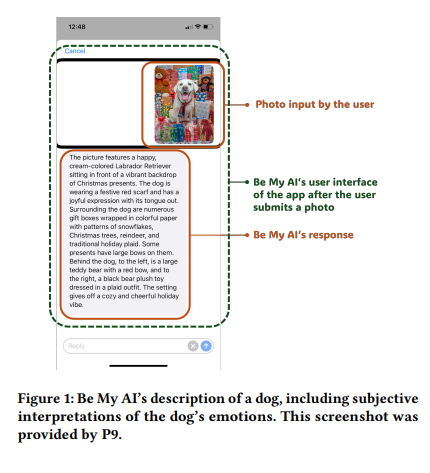
The 6DotsLab reading
Be My AI gave blind and low-vision smartphone users useful descriptions and follow-up answers for everyday visual tasks, but participants still needed their own senses, orientation and mobility skills, and human help when the system invented details, misunderstood their goal, made sensitive identity assumptions, or could not provide real-time guidance.
The problem
The proposed approach
Why it matters
Who benefits most
01 / Evidence
What the researchers actually studied
To understand the capabilities and limitations of large-multimodal-model visual assistance in the daily lives of people with visual impairments, and to identify how users compensate when the system falls short.
The researchers conducted semi-structured Zoom interviews with 14 active Be My AI users and analyzed 50 Be My AI-generated image descriptions: 22 voluntarily shared by 4 interview participants and 28 collected from public posts on X, Facebook, Reddit, and blogs. Interview themes were developed from the data, then the image-description examples were examined using those themes.
Instead of only asking whether the app was usable, the study examined how it changes real tasks, social judgment, identity descriptions, camera use, and navigation, and how blind and low-vision users combine the AI with hearing, touch, spatial memory, orientation and mobility skills, and remote human assistance.
Study type
Qualitative interview study with supplementary analysis of participant-shared and public social-media examples
Blind and low-vision involvement
Yes. Fourteen people with visual impairments were the primary interview participants: 10 were totally blind and 4 had low vision. They contributed lived-experience accounts; 4 also voluntarily shared Be My AI descriptions. The paper does not report that they served as co-designers or formal advisors.
Participants were adults in the United States, aged 20-50 across the reported age bands, and all actively used Be My AI. Interviews lasted 50-76 minutes. The researchers examined perceived usefulness, errors, detail, identity descriptions, tool choice, coping strategies, and examples of real interactions. This was not a controlled accuracy test.
Key results reported in the paper
- 01Seven participants reported that detailed scene descriptions improved their awareness of indoor or outdoor spaces.
- 02Four participants reported hallucinations in which Be My AI described objects or details that were not actually present.
- 03Eleven participants used the app's follow-up-question feature, and seven said it supported greater independence by letting them ask for missing details without immediately contacting a person.
- 04Eight participants reported accuracy or sensitivity problems when the app described identity attributes such as gender or age.
- 05Eight participants turned to human assistants when the app could identify a poor or incomplete photo but could not tell them how to reposition the camera or continue the task.
- 06Six participants described static-photo limitations during navigation, and four emphasized that orientation and mobility skills, a cane, or a guide dog remain essential and cannot be replaced by the app.
02 / Practice
How this could be used—and introduced responsibly
What the tool is
Who it helps most
A practical use case
How it works in daily use
Training and onboarding
Actions practitioners can try
- 01You could start with low-risk tasks such as reading a sign, checking a label, exploring a familiar room, or locating a dropped object.
- 02You could teach targeted questions such as "What is the dial pointing to?", "Is any eggshell visible?", or "Describe the upper-left part of the image."
- 03You could ask the person to compare the answer with touch, hearing, spatial memory, and common sense before acting on it.
- 04You could establish a simple rule: when the answer conflicts with known facts, concerns identity or subjective judgment, or affects safety, switch to a trusted human assistant.
- 05You could reinforce that a cane, guide dog, and orientation and mobility techniques remain the primary tools for travel.
- 06You could treat statements about emotion, attractiveness, age, gender, or style as suggestions to question, not facts to accept.
03 / Boundaries
Safety, limitations, and real-world readiness
Safety note
Do not present the tool as a replacement for orientation and mobility skills, a white cane, or a guide dog. Static photos may miss nearby hazards, distance, stair direction, railings, or obstacles outside the camera view. Taking repeated photos while moving can increase distraction and time. Use human real-time assistance for situations requiring continuous feedback.
What practitioners should know
- 01The first answer may be a general scene description rather than the information needed to finish the task.
- 02The system can invent objects or details and may sound certain while being wrong.
- 03Descriptions of age, gender, emotion, fashion, or animal behavior may reflect stereotypes or unsupported assumptions.
- 04The app can notice that a photo is blurry, dark, cropped, or incomplete without giving enough directional guidance to fix it.
- 05Static photos do not provide the continuous, distance-aware feedback needed for safe navigation.
- 06The study reflects an older version of Be My AI and may not describe later product changes.
Study limitations
- 01The interviews and collected examples covered versions of Be My AI available only up to March 2024, so later changes were not evaluated.
- 02The study used a small, early-stage dataset and did not follow users over a long period.
- 03All interview participants lived in the United States, and only English-language image descriptions were analyzed.
- 04Be My AI did not store conversation history at the time, limiting the researchers' ability to examine longer interaction patterns.
- 05The paper did not report a controlled accuracy benchmark, a safety trial, or a direct performance comparison with other tools.
Deployment status
Technology readiness
Cost and availability
Scaling considerations
04 / Visual evidence
Figures retained from the original paper
Figures are reproduced here as part of the review package supplied to 6DotsLab. Captions below distinguish the paper's original wording from our practitioner-focused explanation.
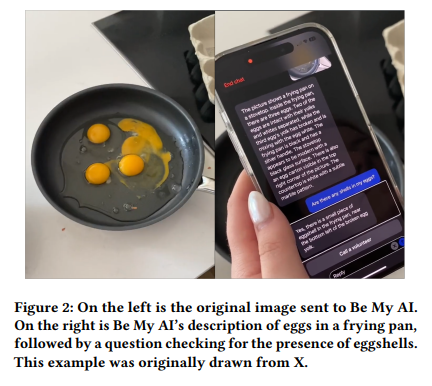
A general description of eggs did not answer the user's actual safety-related question, so the user had to ask directly whether an eggshell was present.
Why it matters: It gives a clear, everyday example of the difference between describing a scene and understanding the user's real goal.
Original figure caption
On the left is the original image sent to Be My AI. On the right is Be My AI’s description of eggs in a frying pan, followed by a question checking for the presence of eggshells. This example was originally drawn from X.
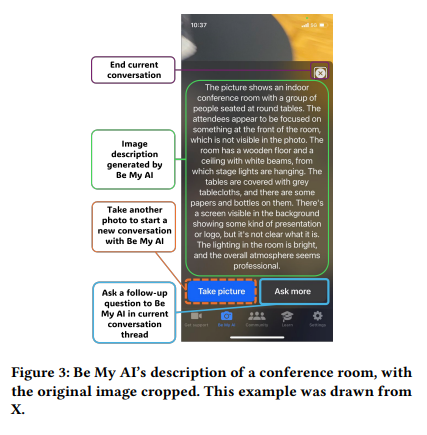
The app can warn that a photo is incomplete, but that warning does not necessarily tell a blind user how to move the phone to capture the missing area.
Why it matters: Camera framing is a major practical barrier that practitioners can address during onboarding.
Original figure caption
Be My AI’s description of a conference room, with the original image cropped. This example was drawn from X.
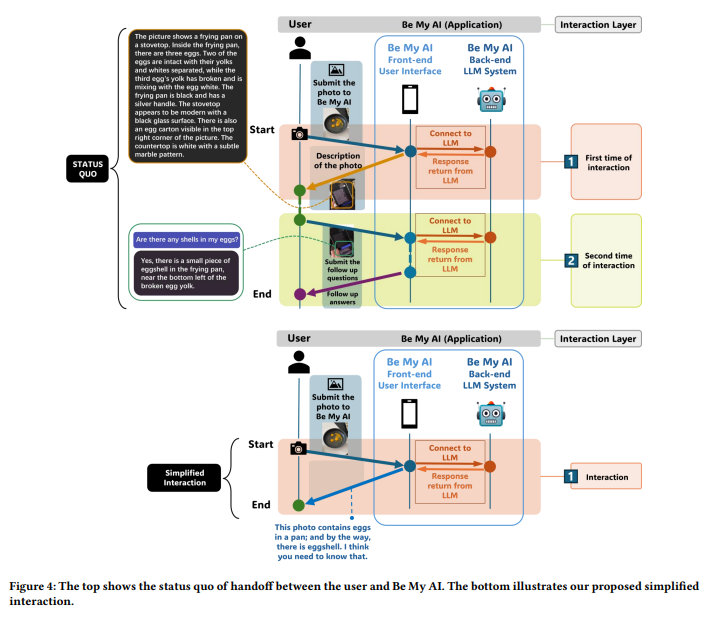
The current interaction may require a general answer and a second question; the proposed design would use context and past preferences to provide the task-relevant detail in the first response.
Why it matters: It helps practitioners understand why repeated prompting can be tiring and what a more supportive future interaction would look like.
Original figure caption
The top shows the status quo of handoff between the user and Be My AI. The bottom illustrates our proposed simplified interaction.
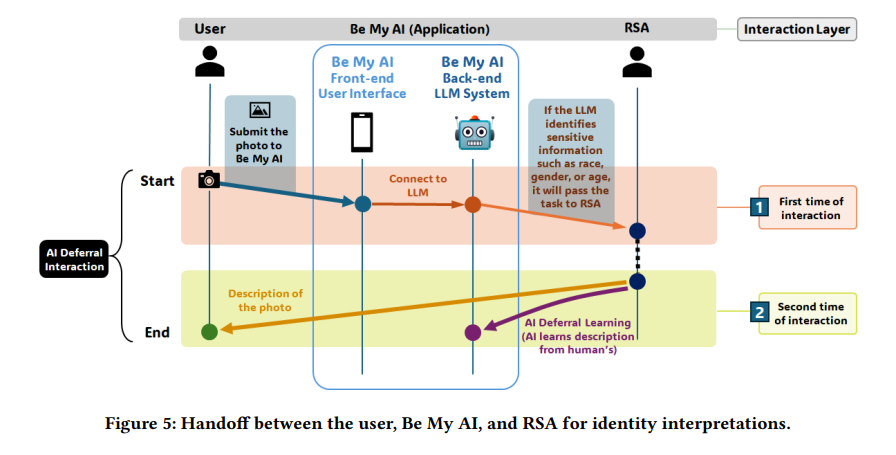
For sensitive identity questions, the proposed system would pass the request to a remote sighted assistant instead of making an uncertain or stereotyped judgment.
Why it matters: It provides a practical model for handling sensitive descriptions while protecting dignity and reducing biased assumptions.
Original figure caption
Handoff between the user, Be My AI, and RSA for identity interpretations.
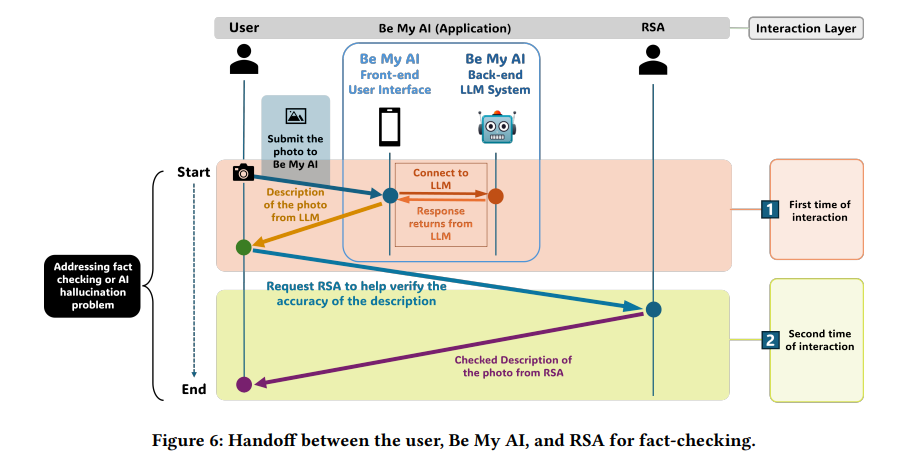
When an AI description seems doubtful, the user can send the same image and the AI's answer to a remote sighted assistant for a faster accuracy check.
Why it matters: It turns the paper's error-management findings into a simple service workflow that practitioners and agencies could adopt.
Original figure caption
Handoff between the user, Be My AI, and RSA for fact-checking.
05 / Human impact
Ethics, autonomy, privacy, and dignity
Autonomy and independence
Stigma and social interpretation
Privacy
Community involvement
06 / Terms
A practitioner glossary
Be My AI
A feature within the Be My Eyes smartphone service that lets a user send a photo to an AI system, hear a description, and ask follow-up questions.
Large multimodal model (LMM)
An AI system that can work with more than one kind of information, such as an image and a written or spoken question, and then produce a language response.
GPT-4
The AI model family reported by the paper as the basis for Be My AI's image-and-language capabilities.
Visual question answering (VQA)
A process in which a person provides an image and asks a question about what is shown in it.
Remote sighted assistance (RSA)
Help from a sighted person at a distance, usually through a phone camera or video connection, who describes a scene or guides a task.
Orientation and mobility (O&M)
The skills and training blind and low-vision people use to understand where they are and travel safely, often with a white cane or guide dog.
AI hallucination
A confident AI description of an object, detail, or event that is not actually present in the image.
Prompt
The question or instruction a user gives the AI, such as asking it to check a specific dial setting instead of describing the whole room.
Context awareness
The system's ability to understand the surrounding situation, not just name isolated objects.
Intent-oriented capability
The system's ability to understand what the user is trying to accomplish and provide information that helps complete that goal.
Static image
A single photograph that captures only one moment and one camera view.
Real-time video processing
Continuous analysis of a live camera view so the system can respond as the person or scene moves.
Deferral learning
A proposed approach in which the AI learns when a question is too sensitive or uncertain and passes it to a qualified human instead of answering alone.
Multi-agent system
A service in which more than one helper, such as an AI and a human assistant or two different AIs, divide a task and pass information between them.
Cognitive load
The amount of mental effort needed to remember information, notice gaps, and decide what question to ask next.
Semi-structured interview
A research conversation guided by prepared topics while allowing participants to explain unexpected experiences in detail.
Thematic analysis
A method for grouping repeated ideas and experiences from interviews into clear themes.
Co-design
A process in which intended users help make design decisions as partners, rather than only testing or commenting on a finished system.
Technology readiness level (TRL)
A 1-to-9 scale used to describe how mature a technology is, from an early idea to a system proven in real-world use.
07 / Credit
Read and cite the original work
Authors
Jingyi Xie, Rui Yu, He Zhang, Syed Masum Billah, Sooyeon Lee, John M. Carroll
APA citation
Xie, J., Yu, R., Zhang, H., Billah, S. M., Lee, S., & Carroll, J. M. (2025). Beyond visual perception: Insights from smartphone interaction of visually impaired users with large multimodal models. In CHI Conference on Human Factors in Computing Systems (CHI ’25) (pp. 1–17). Association for Computing Machinery. https://doi.org/10.1145/3706598.3714210
Show BibTeX
@inproceedings{Xie2025BeyondVisualPerception,
  author = {Jingyi Xie and Rui Yu and He Zhang and Syed Masum Billah and Sooyeon Lee and John M. Carroll},
  title = {Beyond Visual Perception: Insights from Smartphone Interaction of Visually Impaired Users with Large Multimodal Models},
  booktitle = {Proceedings of the 2025 CHI Conference on Human Factors in Computing Systems},
  year = {2025},
  pages = {1--17},
  publisher = {Association for Computing Machinery},
  address = {New York, NY, USA},
  location = {Yokohama, Japan},
  doi = {10.1145/3706598.3714210},
  url = {https://doi.org/10.1145/3706598.3714210}
}
Review quality flags
- The paper reports 5 blogpost image descriptions but also states that 8 of those descriptions contained follow-up questions. That count is internally inconsistent and should be checked against the original dataset or publication.
- The number 14 refers only to interview participants. The paper does not report the number of distinct visually impaired people represented in the public social-media examples.
